An entire UX case study and redesign of the intranet to enhance the overall user experience


Overview
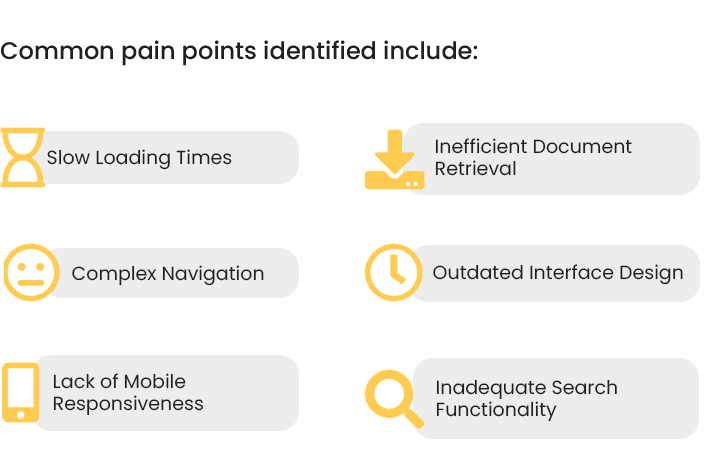
The intranet portal is a central hub at YASH for accessing resources, collaborating on projects, and staying updated. Identified pain points include slow loading times, complex navigation, and document retrieval challenges. This case study details a UX research and design process to revamp the intranet, aligning it with user needs and enhancing efficiency while reflecting YASH's commitment to innovation and user-centric design.

Problem Statement
YASH Tech. struggles with usability issues on its outdated intranet, causing inefficient navigation and limited collaboration tools. The unappealing interface and accessibility concerns hinder employee productivity and satisfaction.

Solution Statement
To address these challenges with its outdated intranet we're redesigning YASH Tech.'s intranet to modernize it, improve navigation and ensure better accessibility. Our goal is to boost employee productivity, satisfaction, and overall user experience.











Design Process
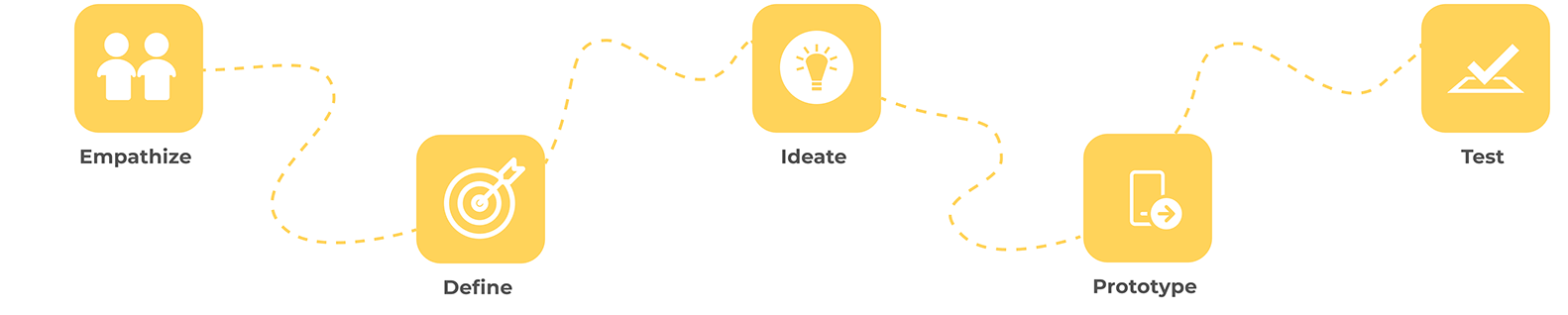
I. Empathize
A. User Interviews:
Conducted interviews with 25 employees across different departments to understand their experiences and gather insights.
Common pain points identified include:

B. User Journey Map:

Mapped out the user journey from login to task completion, highlighting touchpoints and pain points. Discovered that employees often face frustration during document retrieval and collaboration tasks.










C. Affinity Mapping

To identify patterns and themes in the data collected from user interviews, surveys, and usability testing, an affinity mapping exercise was conducted. The following clusters represent the common pain points and challenges faced by users on the current intranet portal:
II. DEFINE
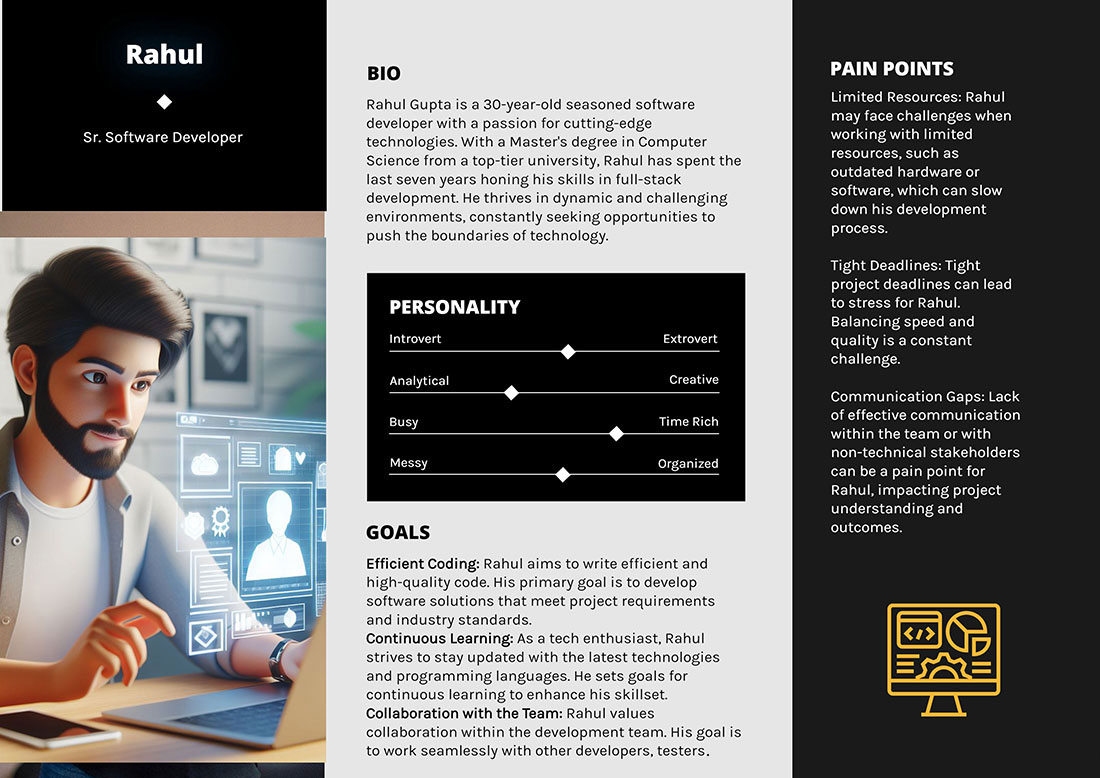
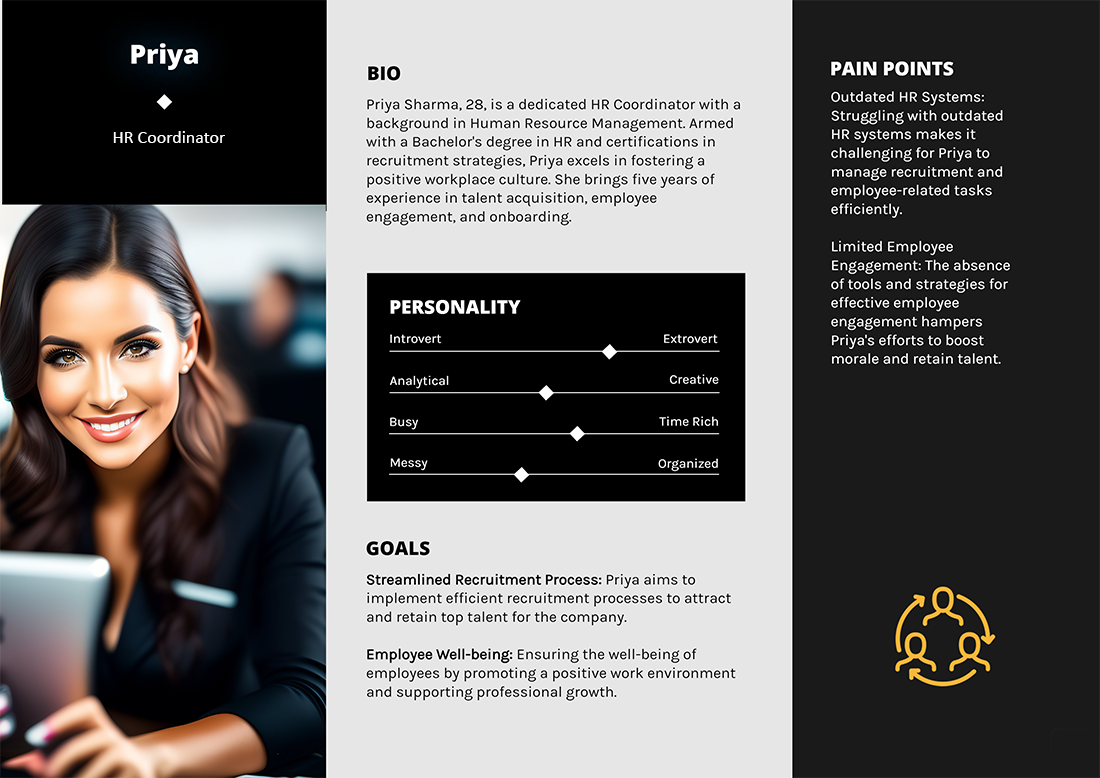
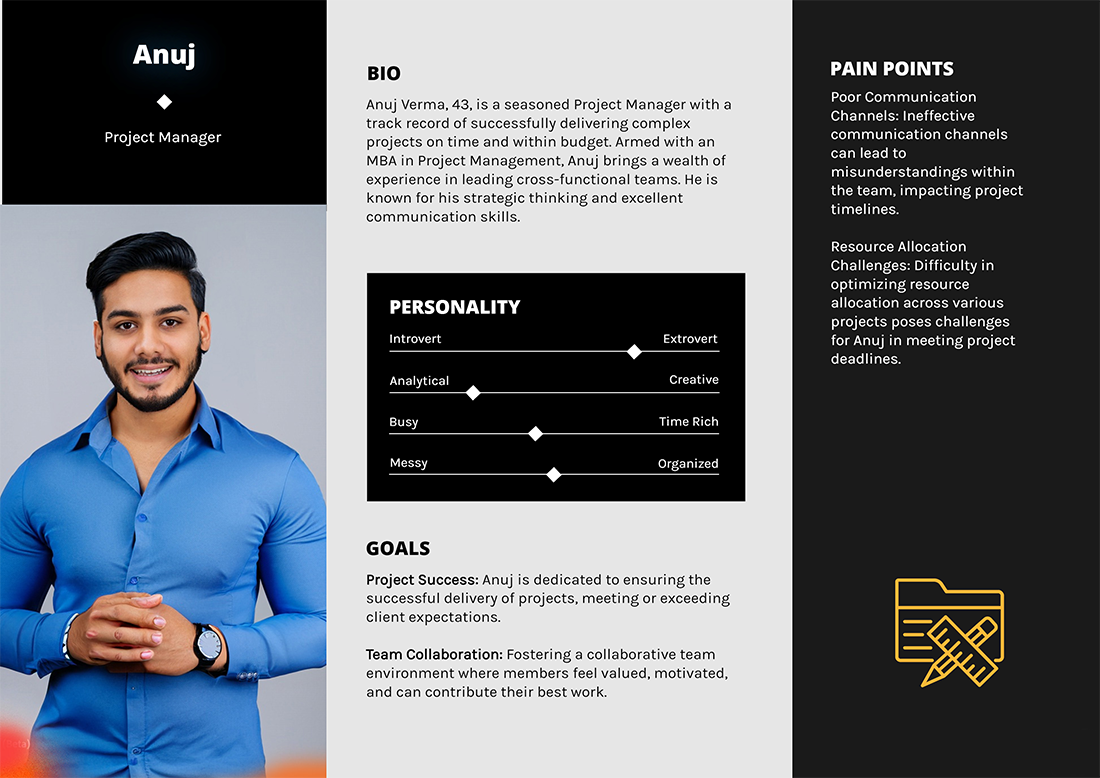
Personas:
Competitive Analysis
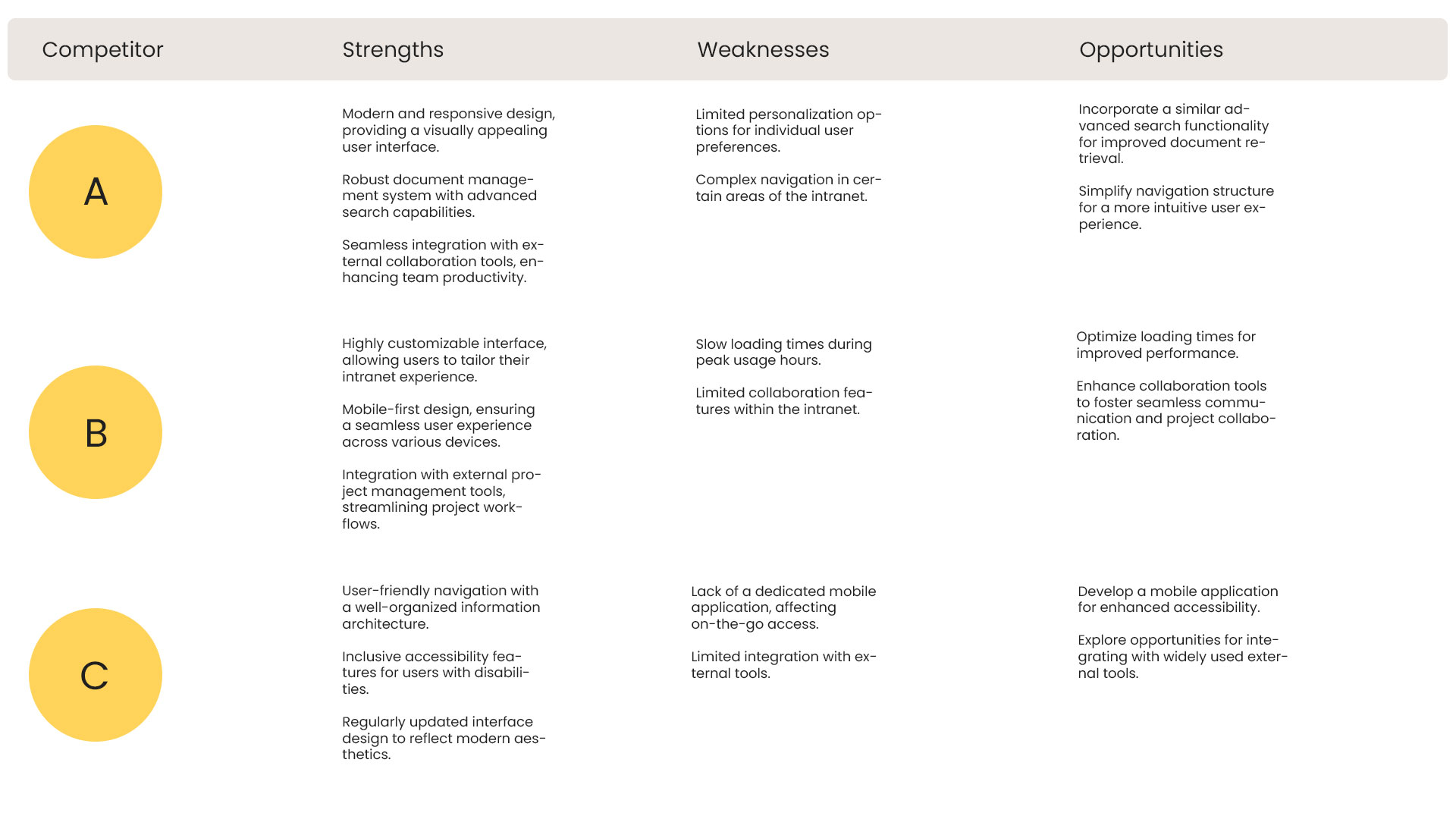
Analyzed data from competitors in the IT sector to identify best practices and innovative features. YASH lags behind in mobile responsiveness and user-centric design.
Insights for YASH:
- YASH lags behind in terms of mobile responsiveness, customization, and external tool integration.
- The visual design can be modernized to align with current industry standards.
- Incorporating advanced search features, streamlining navigation, and optimizing performance are crucial areas for improvement.
This competitive analysis provides valuable insights for the redesign process, guiding the identification of features and functionalities that can enhance YASH' intranet portal and elevate it to industry standards.
Quantitative and Qualitative Research
A. Quantitative Research
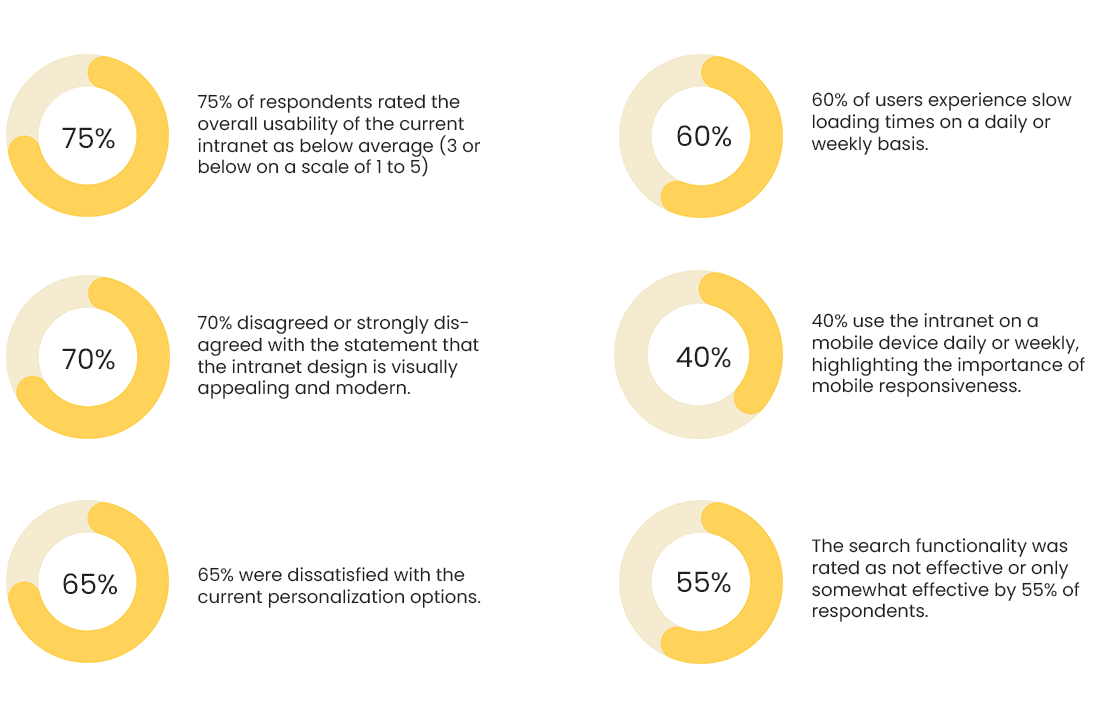
Online Survey: Conducted a online survey distributed to 200 employees across various departments within YASH. The survey aimed to collect quantitative data on the current intranet usage and user satisfaction.
Key Questions:
- On a scale of 1 to 5, how would you rate the overall usability of the current intranet portal?
- How often do you experience slow loading times on the intranet? (Daily, Weekly, Monthly, Rarely, Never)
- To what extent do you agree with the statement: "The current intranet design is visually appealing and modern?" (Strongly Disagree to Strongly Agree)
- How often do you use the intranet on a mobile device? (Daily, Weekly, Monthly, Rarely, Never)
- Rate your satisfaction with the personalization options available on the intranet. (Very Dissatisfied to Very Satisfied)
- How effective is the current search functionality in helping you find relevant information? (Not Effective to Very Effective)
Survey Results:
B. Qualitative Research:
User Interviews: Conducted in-depth interviews with 15 employees from different departments, aiming to gather qualitative insights into their experiences, challenges, and suggestions related to the intranet.
Key Interview Questions & Findings:
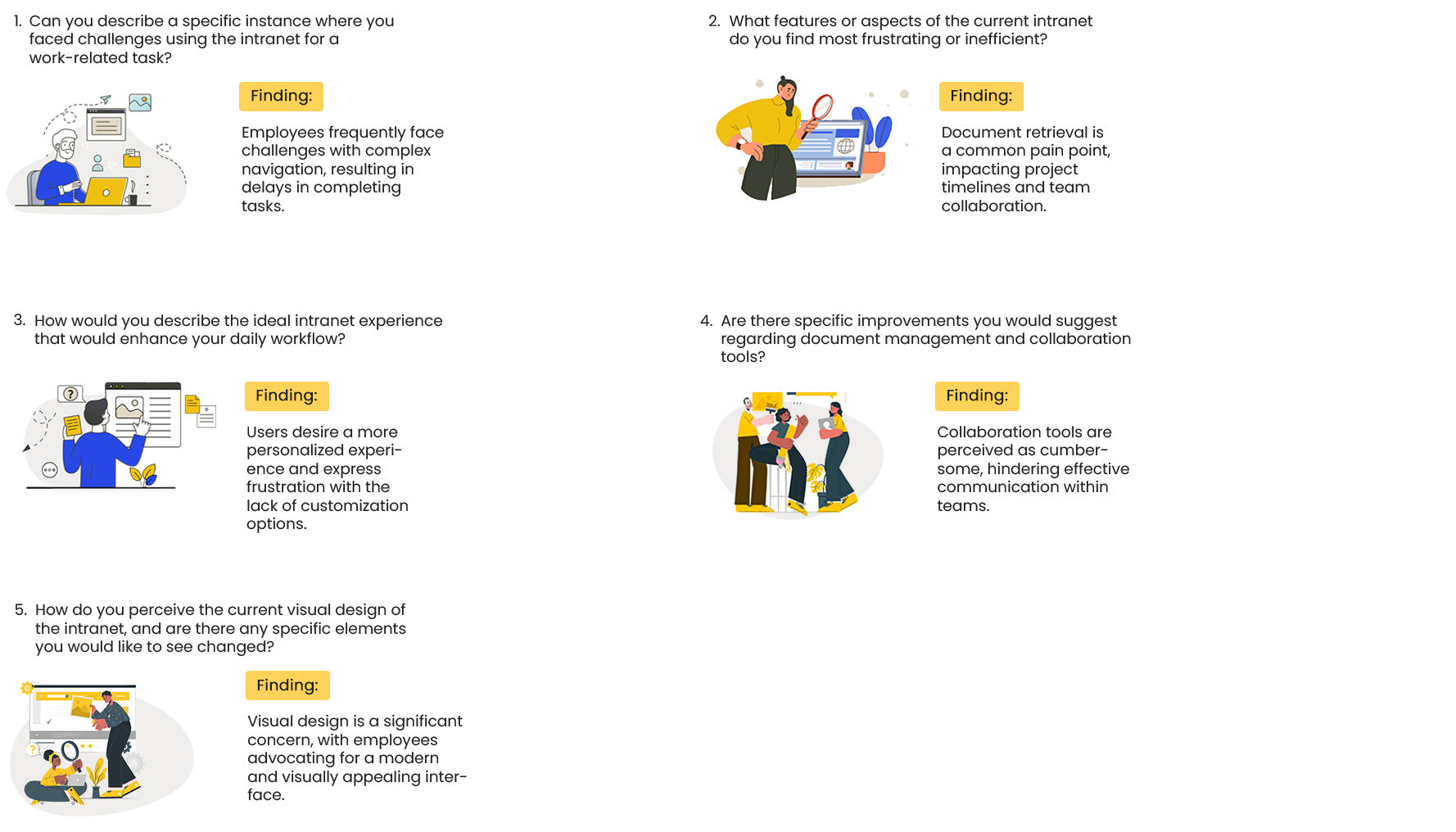
Conclusion: The quantitative and qualitative research provides a comprehensive understanding of user perceptions and experiences with the current intranet. The combination of survey data and interview findings serves as a robust foundation for identifying specific pain points and areas for improvement in the redesign process. This user-centric approach ensures that the redesigned intranet addresses real user needs and aligns with the goals of enhancing usability and overall satisfaction.
III. Analysis
A. User Flows:
To ensure a seamless and efficient user experience, the user flows have been developed based on identified pain points and user expectations.
Click here to see user flows that represent common scenarios and interactions within the intranet portal:
B. Sitemap:
The sitemap outlines the structure and hierarchy of the intranet, ensuring a logical organization of content and intuitive navigation. The following sitemap reflects the identified user flows, pain points, and features for the redesign:
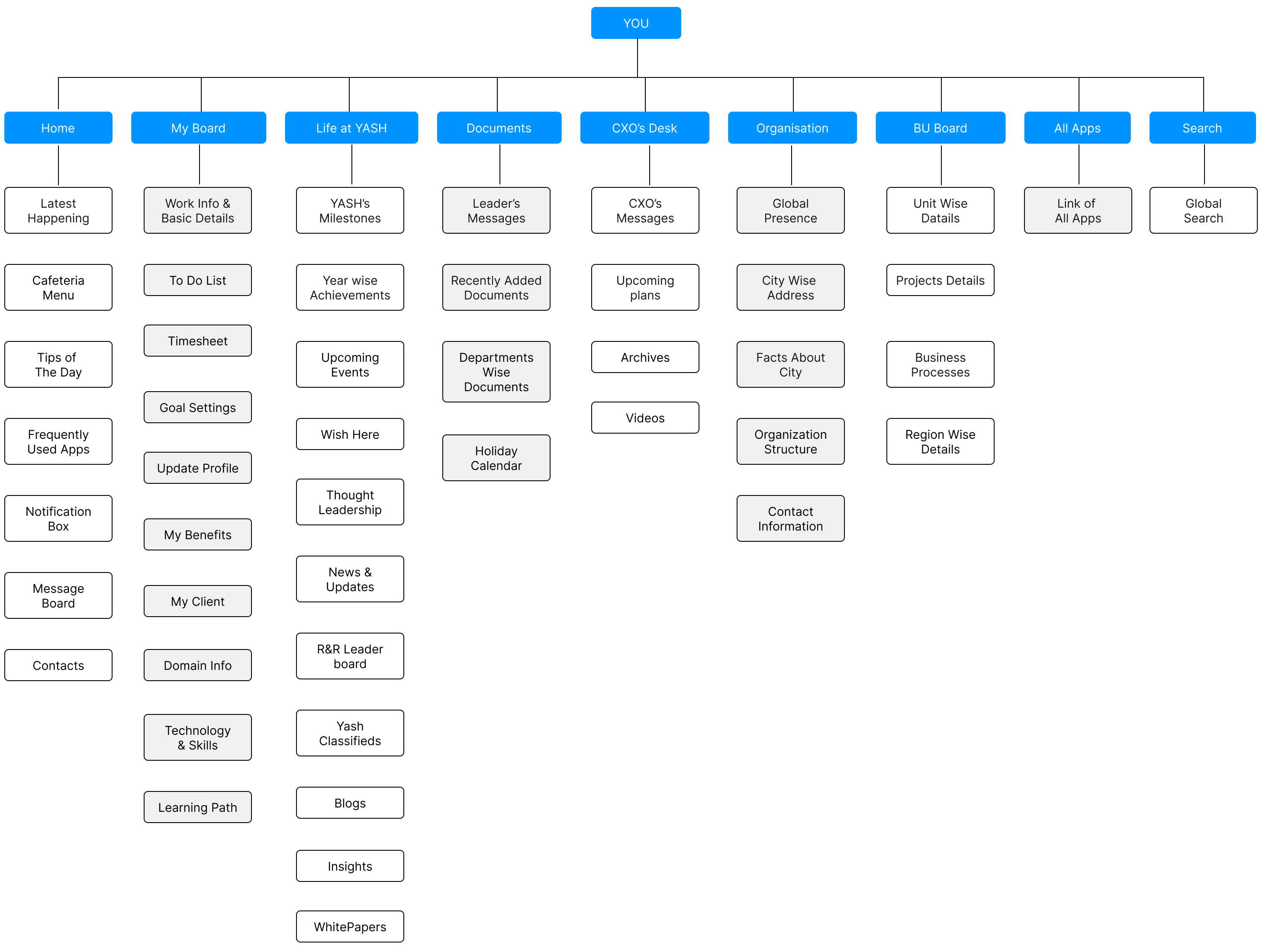
The revised sitemap aims to provide a structured and intuitive navigation experience for users, covering personalized dashboards, company updates, executive communications, organizational information, and access to a variety of applications. The inclusion of "My Board," "Life at YASH," "CXO's Desk," "Organization," and "All Apps" ensures that users can easily access relevant information and tools, contributing to a more user-friendly and engaging intranet experience.
C. Accessibility Evaluation:
Ensuring accessibility is a crucial aspect of the YASH's intranet redesign to provide an inclusive user experience for all employees, including those with disabilities. The accessibility evaluation covers various aspects, including compliance with Web Content Accessibility Guidelines (WCAG) 2.1, usability for users with different abilities, and recommendations for improvement. Click here to see the Evaluation Methodology in detail
IV. Final Deliverables:
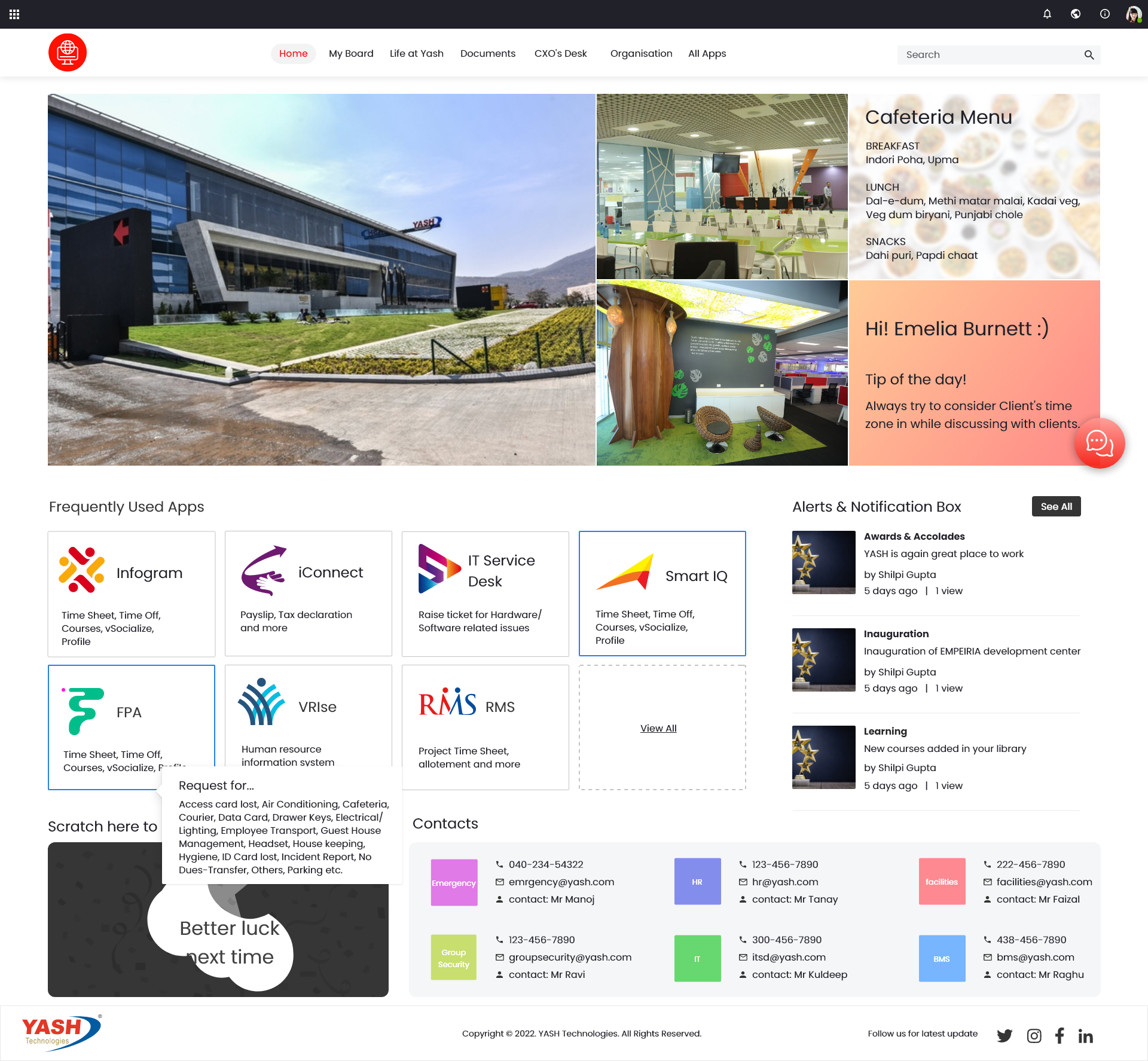
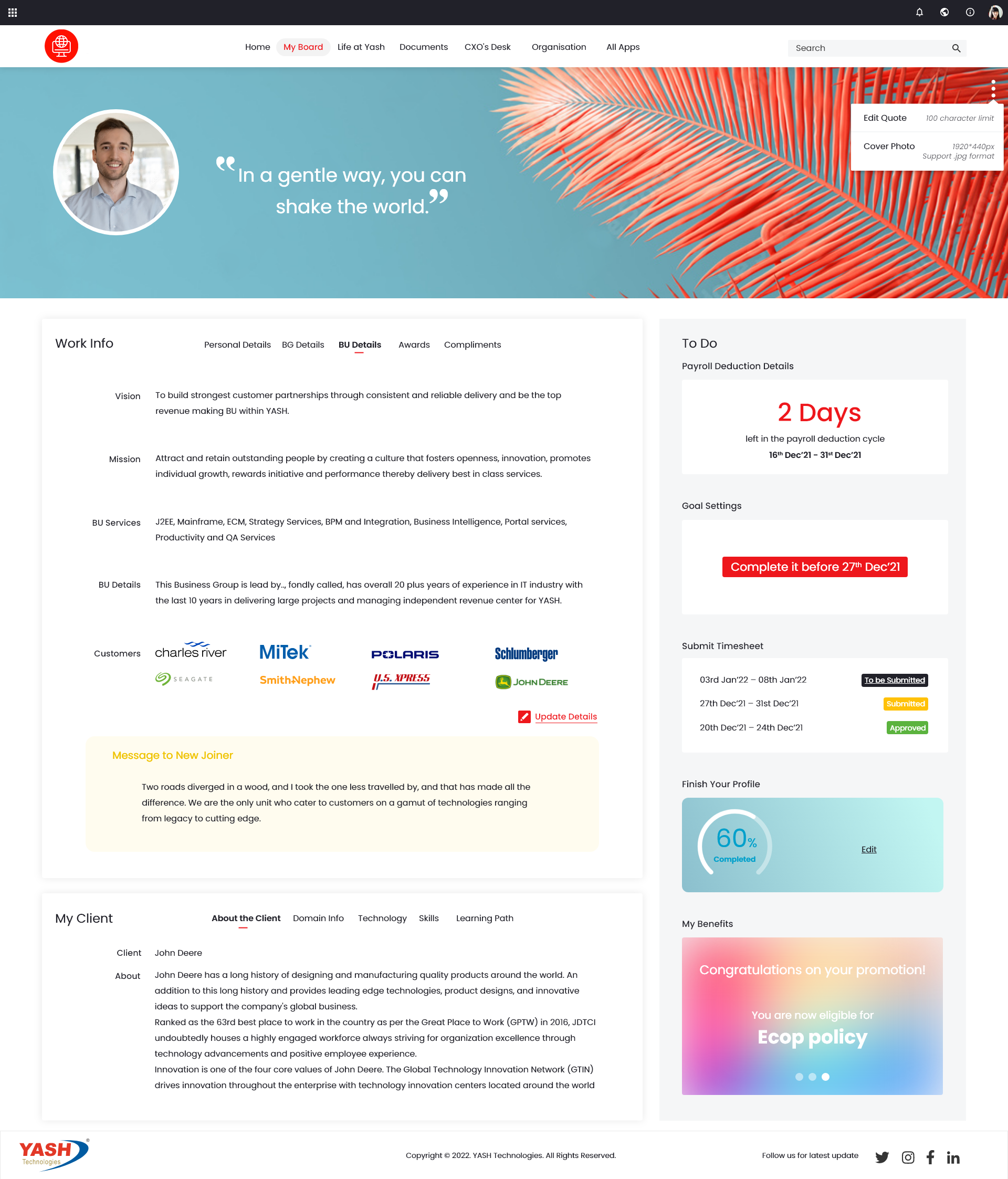
1. High-Fidelity Designs:
Produced high-fidelity designs incorporating visual elements, branding, and a cohesive design language, addressing the identified pain points.
2. Design System Documentation:
The design system documentation provides a comprehensive guide for the consistent implementation of design elements and components across the YASH's intranet. This document includes guidelines, principles, and specifications to ensure a unified and visually appealing user interface.
A. Design Principles:
- Principles:
- Clarity: Prioritize clear and straightforward communication.
- Consistency: Maintain a consistent visual language and interaction patterns.
- Accessibility: Ensure compliance with WCAG 2.1 standards.
- Flexibility: Design for adaptability to various screen sizes and devices.
B. Color Palette:
- Color Palette:
- Primary Colors:
- Blue (#007BFF): Used for primary elements, buttons, and links.
- Green (#28A745): Indicates success and positive actions.
- Red (#DC3545): Indicates errors or critical actions.
- Neutral Colors:
- White (#FFFFFF): Background color.
- Gray (#6C757D): Used for borders, dividers, and secondary text.
C. Typography:
- Typography:
- Heading Fonts:
- Montserrat: Used for headings (H1-H6).
- Body Fonts:
- Open Sans: Used for body text and general content.
D. Iconography:
- Iconography:
- Utilize the Material Design icon set for consistency.
- Provide alternative text for each icon for accessibility.
E. Spacing and Layout:
- Spacing:
- Maintain consistent spacing between elements for a balanced layout.
- Use a 4-pixel baseline grid for vertical rhythm.
F. Buttons and Interactive Elements:
- Button Styles:
- Standard Button: Rectangular, filled background with primary color.
- Outline Button: Outlined button with primary color.
- Disabled State: Diminished opacity for disabled buttons.
G. Form Elements:
- Form Guidelines:
- Standard Input Fields: Rectangular input fields with subtle borders.
- Dropdowns: Use a clear visual indicator for dropdown menus.
- Error States: Clearly highlight errors with a red border and error message.
H. Navigation:
- Navigation Styles:
- Top Navigation Bar: Primary navigation with essential links.
- Side Navigation: Secondary navigation for specific sections.
- Breadcrumbs: Sequential navigation for user orientation.
I. Cards and Containers:
- Card Styles:
- Standard Card: Rectangular container with a drop shadow.
- Image Card: Card with an image at the top and accompanying text.
J. Responsive Design:
- Responsive Guidelines:
- Utilize a mobile-first approach for design and development.
- Ensure all components adapt to various screen sizes.
K. Accessibility Guidelines:
- Accessibility Best Practices:
- Provide alternative text for all images.
- Ensure proper color contrast for text and interactive elements.
- Use semantic HTML elements for better screen reader compatibility.
L. Documentation Tools:
- Documentation Tools:
- Figma: Primary design tool for creating and sharing design assets.
- Zeplin: Collaboration tool for designers and developers.
- Confluence: Centralized platform for storing and sharing design documentation.
Next Steps:
- Training and Onboarding: Conduct training sessions for design and development teams on the usage of the design system.
- Feedback Mechanism: Establish a process for collecting feedback and addressing issues or improvements in the design system.
- Version Control: Implement version control to manage updates and changes to the design system.
This design system documentation serves as a comprehensive guide for the consistent implementation of design elements, ensuring a cohesive and user-friendly experience across the YASH's intranet.
Conclusion: Through a comprehensive research and design process, the redesigned intranet portal for YASH aims to address identified pain points, improve user satisfaction, and align with the organization's goals. The iterative nature of the process ensures that user feedback is incorporated at each stage, resulting in a user-centric and effective solution for the company's intranet needs.